Current Position:FEELWORLD official website>English>Products>Field Monitor>SDI Field Monitor>content
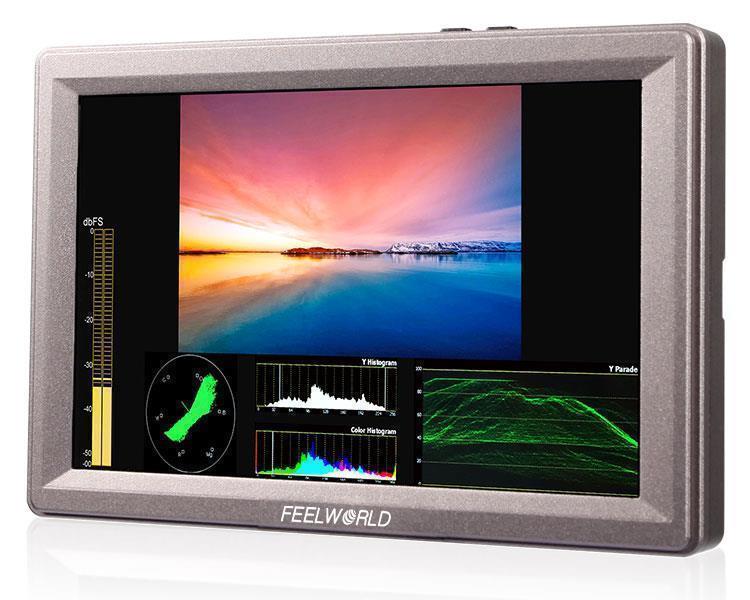
FEELWORLD Z73 7 Inch 1280x800 SDI/ 4K HDMI DSLR Field On-camera Monitor with Scopes Rugged Aluminum Housing


×
![]()
| Number: | 201912181521081804 |
|---|---|
| Model: | Z73 |
| Size: | 7" |
| Introduction: |
Screen Size: 7" IPS Resolution: 1280x800 pixels Aspect ratio: 16:10 Brightness: 400cd/m² |
| Input: | 3G-SDI, HDMI, Video, Audio(L/R) |
| Output: | 3G-SDI, HDMI, Video, Stereo Headphone, Speaker(built-in) |
| DM: | |
| Download: | |


Powerful Tools, Sophisticated Shots
FEELWORLD Z73 is packed with an extensive suite of scopes, one button operation and simple to use. You can get a set of highly accurate tools for focus, framing & exposure (Waveform, vectorscope, RGB Histogram, Y Histogram, Embedded Audio, Peaking Focus Assist, False Color, Zebra Exposure,check Field, Scan Mode, Image Flip, Image Freeze, Pixel to Pixel, Zoom, Center Marker, Safe Area, Marker Type and options for anamorphic de-squeeze monitoring). Help you accurately expose and focus every shot with confidence.
FEELWORLD Z73 is packed with an extensive suite of scopes, one button operation and simple to use. You can get a set of highly accurate tools for focus, framing & exposure (Waveform, vectorscope, RGB Histogram, Y Histogram, Embedded Audio, Peaking Focus Assist, False Color, Zebra Exposure,check Field, Scan Mode, Image Flip, Image Freeze, Pixel to Pixel, Zoom, Center Marker, Safe Area, Marker Type and options for anamorphic de-squeeze monitoring). Help you accurately expose and focus every shot with confidence.

7-inch 1280x800 IPS Screen
Shoot better video
FEELWORLD Z73 features a 7” high resolution screen, the screen has a 1280 x 800 resolution to achieve high-definition screen point-to-point display, ensure that the director, film crew to see the color accurately , and let different cameras show the real consistent image when you shooting video.
Shoot better video
FEELWORLD Z73 features a 7” high resolution screen, the screen has a 1280 x 800 resolution to achieve high-definition screen point-to-point display, ensure that the director, film crew to see the color accurately , and let different cameras show the real consistent image when you shooting video.

IPS Wider View Angle 178°
Easy for the camera crew monitoring
FEELWORLD Z73 features the screen with a wide 178°viewing angle, which means it’s easy to see, even when several crew members are watching.
Easy for the camera crew monitoring
FEELWORLD Z73 features the screen with a wide 178°viewing angle, which means it’s easy to see, even when several crew members are watching.

True Color · Professional Color Calibration
Use Rec.709 color standard
FEELWORLD uses the professional Rec.709 HD color standard, and uses the color calibration technology, with the professional instrument calibration at the factory, it can achieve monitor calibration efficiently and get accurate color reproduction easily, do not distort the color, show the real image when you shooting video.
FEELWORLD uses the professional Rec.709 HD color standard, and uses the color calibration technology, with the professional instrument calibration at the factory, it can achieve monitor calibration efficiently and get accurate color reproduction easily, do not distort the color, show the real image when you shooting video.

Accurate Color Reproduction
FEELWORLD monitor support ITU standards and HD video Rec.709 standard consistent color space, advanced image processing technology, so that the image clearly presented, the color is extremely natural, to ensure accurate color reproduction, to reproduce the physical nature of shooting, enabling users to accurately evaluate the quality of various input video signals.
FEELWORLD monitor support ITU standards and HD video Rec.709 standard consistent color space, advanced image processing technology, so that the image clearly presented, the color is extremely natural, to ensure accurate color reproduction, to reproduce the physical nature of shooting, enabling users to accurately evaluate the quality of various input video signals.

Innovation OSD Operation
Use simple operation to make adjustments
When it comes to Z73 monitor function design, it is simple and fast, help you improve the speed and efficiency of your shots.
Switch signals quickly: VIDEO, HDMI, SDI. Six assignable shortcut keys: for fast access to the functions you needs, like Waveform, Vectorscope, Histogram, Peaking, False Color and other functions.
Four multi-functional knobs: immediate access to Menu, Saturation, Brightness, Contrast, Volume.
Use simple operation to make adjustments
When it comes to Z73 monitor function design, it is simple and fast, help you improve the speed and efficiency of your shots.
Switch signals quickly: VIDEO, HDMI, SDI. Six assignable shortcut keys: for fast access to the functions you needs, like Waveform, Vectorscope, Histogram, Peaking, False Color and other functions.
Four multi-functional knobs: immediate access to Menu, Saturation, Brightness, Contrast, Volume.

Professional Connections
Connect to professional cameras, camcorders and DSLR's
The compact design of the FEELWORLD Z73 includes 4K HDMI, 3G-SDI, Video and Audio(L/R) so you can connect them to virtually any DSLR, prosumer professional camera or other signal source equipment! The loop output lets you monitor on larger displays or projectors. Z73 also features stereo earphone output for easy monitoring, along with a built in speaker that making it easy for everyone to review shots!
Connect to professional cameras, camcorders and DSLR's
The compact design of the FEELWORLD Z73 includes 4K HDMI, 3G-SDI, Video and Audio(L/R) so you can connect them to virtually any DSLR, prosumer professional camera or other signal source equipment! The loop output lets you monitor on larger displays or projectors. Z73 also features stereo earphone output for easy monitoring, along with a built in speaker that making it easy for everyone to review shots!


Multi-display device monitoring simultaneously
The Z73 has 3G-SDI, 4K HDMI in and loop-out, allowing it to not only display live signals, but also send them out to other monitors simultaneously. It's the ability to display live picture on multiple displays at once while still maintaining the original video quality.
The Z73 has 3G-SDI, 4K HDMI in and loop-out, allowing it to not only display live signals, but also send them out to other monitors simultaneously. It's the ability to display live picture on multiple displays at once while still maintaining the original video quality.


Powerful Scopes
Accurate waveform monitoring
When you need to analyze image quality more accurately than simply looking at the picture then use Z73's built in waveform monitoring! Choose from waveform, vectorscope, histogram and audio phase and level displays, and get broadcast accurate waveform monitoring that shows everything you need to know technically about your video and audio signals. Z73 is perfect for live production monitoring and removes the need for separate expensive scopes!
Accurate waveform monitoring
When you need to analyze image quality more accurately than simply looking at the picture then use Z73's built in waveform monitoring! Choose from waveform, vectorscope, histogram and audio phase and level displays, and get broadcast accurate waveform monitoring that shows everything you need to know technically about your video and audio signals. Z73 is perfect for live production monitoring and removes the need for separate expensive scopes!

3-color Tally Light
Film crew shooting convenient control
Z73 monitors feature a clear LCD screen with tally so it’s the perfect solution for live broadcasts. Unlike a simple tally light, Z73 uses green, red and yellow three color tally light to indicate when you are recording or on-air, or which camera is cued up on your switcher’s preview output during live production. Tally is connected via an industry standard parallel pin connector on the rear panel so you get compatibility with switchers or automation systems.
Film crew shooting convenient control
Z73 monitors feature a clear LCD screen with tally so it’s the perfect solution for live broadcasts. Unlike a simple tally light, Z73 uses green, red and yellow three color tally light to indicate when you are recording or on-air, or which camera is cued up on your switcher’s preview output during live production. Tally is connected via an industry standard parallel pin connector on the rear panel so you get compatibility with switchers or automation systems.

Mounting Points
Attach to cameras, equipment carts or hang it anywhere
The outer frame is made out of durable aluminum and features standard ¼” mount points on the left, right and bottom. You can use the mounting points to attach it to the top of a camera, you can hang it from rigs with the image flip function and use it as a monitor for the entire crew, or use the built in kick stand to set it up on a table. It’s even comfortable enough to hold in your hands so you can pass it around to the crew.
Attach to cameras, equipment carts or hang it anywhere
The outer frame is made out of durable aluminum and features standard ¼” mount points on the left, right and bottom. You can use the mounting points to attach it to the top of a camera, you can hang it from rigs with the image flip function and use it as a monitor for the entire crew, or use the built in kick stand to set it up on a table. It’s even comfortable enough to hold in your hands so you can pass it around to the crew.

Uninterruptible Power
Plug it in or go mobile
Z73 has a flexible power supply design so you can use it anywhere. When connected to the 12V DC/ XLR input (can be using 12V/1.5A adapter) you get continuous power or you can run it off of F970 rechargeable battery on the standard F970 battery plate. And Z73 supports F970 battery plate (standard), D28S/D54, LP-E6 and U60 battery plate (optional).
Sony F970 battery plate for battery of Sony DV: Sony F970 F960 F950 F930 F770 F750 F730 F570 F550 F530 series. (Note: the battery is NOT standard accessory!)
When you turn off the monitor, you need to press the power button, and you can't pull out the power cable directly.
Plug it in or go mobile
Z73 has a flexible power supply design so you can use it anywhere. When connected to the 12V DC/ XLR input (can be using 12V/1.5A adapter) you get continuous power or you can run it off of F970 rechargeable battery on the standard F970 battery plate. And Z73 supports F970 battery plate (standard), D28S/D54, LP-E6 and U60 battery plate (optional).
Sony F970 battery plate for battery of Sony DV: Sony F970 F960 F950 F930 F770 F750 F730 F570 F550 F530 series. (Note: the battery is NOT standard accessory!)
When you turn off the monitor, you need to press the power button, and you can't pull out the power cable directly.


Special Design Sunshade
Outdoor shooting see clearly
When you are shooting outdoors, especially in bright light conditions, the sunshade can reduces the reflections during outdoor shooting. In farther away, you can also see the picture. It can be installed or uninstalled very easily.
Outdoor shooting see clearly
When you are shooting outdoors, especially in bright light conditions, the sunshade can reduces the reflections during outdoor shooting. In farther away, you can also see the picture. It can be installed or uninstalled very easily.

Rugged Aluminum Design
Light weight, durable construction
The frame of the Z73 is made from aircraft grade aluminum which means you get an incredibly sturdy metal that barely adds any weight to your camera. The aluminum is precision machined into the intricate shape needed to house the connections and screen display. It's also extremely strong, which makes it perfect for bracing the mounting points. You get a heavy duty metal that is comfortable enough to hold in your hand and still light enough to be mounted on even the small rig.
Light weight, durable construction
The frame of the Z73 is made from aircraft grade aluminum which means you get an incredibly sturdy metal that barely adds any weight to your camera. The aluminum is precision machined into the intricate shape needed to house the connections and screen display. It's also extremely strong, which makes it perfect for bracing the mounting points. You get a heavy duty metal that is comfortable enough to hold in your hand and still light enough to be mounted on even the small rig.

1. 1280×800, 800:1 contrast, IPS wide view angle H/V 178°
2. 3G/HD/SD-SDI, HDMI, Video input
3. Monitoring via front panel 3.5mm stereo headphone jacks, built-in speaker
4. Built-in LED tally indicators (Red, Green, Yellow)
5. Power using included 12-volt supply or use standard 4-pin XLR
6. Special Features:
*Waveform(Y/Cb/Cr/R/G/B))
*Vector Scope
*Histogram(Y/R/G/B/RGB/Tint)
*Embedded Audio Monitoring
*Focus Assist (Red highlight over parts of the monochrome image in focus)
*False Colors
*Zebra Exposure (1-100IRE adjustable)
*Check Field (Gray/ Red/ Green/ Blue)
*Nine Grid Zoom (Zoom one of the images to realize the full screen)
*Scan Mode (Under Scan, Over Scan)
*Zoom (4X, 9X, 16X)
*Pixel to Pixel
*Center Marker
*Safe Frames (80%,85%,90%,93%,96%,2.35:1)
*Ratio marker (4:3,13:9,14:9,15:9,16:9,1.85:1,2.35:1)
*Mark Color (Red,Green,Blue,Black,White)
*Image Flip (Horizontal, Vertical, Hor&Ver)
*Image Freeze
*Zoom All
*U/D & L/R Zoom
*Color Temperature Adjustment
2. 3G/HD/SD-SDI, HDMI, Video input
3. Monitoring via front panel 3.5mm stereo headphone jacks, built-in speaker
4. Built-in LED tally indicators (Red, Green, Yellow)
5. Power using included 12-volt supply or use standard 4-pin XLR
6. Special Features:
*Waveform(Y/Cb/Cr/R/G/B))
*Vector Scope
*Histogram(Y/R/G/B/RGB/Tint)
*Embedded Audio Monitoring
*Focus Assist (Red highlight over parts of the monochrome image in focus)
*False Colors
*Zebra Exposure (1-100IRE adjustable)
*Check Field (Gray/ Red/ Green/ Blue)
*Nine Grid Zoom (Zoom one of the images to realize the full screen)
*Scan Mode (Under Scan, Over Scan)
*Zoom (4X, 9X, 16X)
*Pixel to Pixel
*Center Marker
*Safe Frames (80%,85%,90%,93%,96%,2.35:1)
*Ratio marker (4:3,13:9,14:9,15:9,16:9,1.85:1,2.35:1)
*Mark Color (Red,Green,Blue,Black,White)
*Image Flip (Horizontal, Vertical, Hor&Ver)
*Image Freeze
*Zoom All
*U/D & L/R Zoom
*Color Temperature Adjustment

Video Analysis Assistant Pattern
Waveform / Vector scope / Histogram
Waveform / Vector scope / Histogram
Waveform
Waveform monitoring consist of R,G,B,Y(Lumilance),Cb and Cr waveform,which used for mesuring the brightness,luminance or chroma values from a video input signal,It not only can warm the user for out-of-range conditions such as overexposure errors,but also assist with colour correction&camera white and black balance.
Waveform monitoring consist of R,G,B,Y(Lumilance),Cb and Cr waveform,which used for mesuring the brightness,luminance or chroma values from a video input signal,It not only can warm the user for out-of-range conditions such as overexposure errors,but also assist with colour correction&camera white and black balance.

Vectorscope
Vector scope shows how saturated the image is and where the pixels in the image land on the color spectrum. It can also be displayed in various sizes & positions, that allows users to monitor color gamut range in real time.
Vector scope shows how saturated the image is and where the pixels in the image land on the color spectrum. It can also be displayed in various sizes & positions, that allows users to monitor color gamut range in real time.
Histogram
Histogram consist of RGB, Color, Y, R, G, B histograms
>Color histogram:shows the red,green and blue channels in overlay histogram.
>RGB histogram:shows histogram for each of red, green and blue channels.
>Luminance histogram:shows the distribution of brightness in and image as a graph of luminance
The three modes can be selected to meet user's best needs and view visually the exposure of whole and each RGB channels.Users have the full contrast range of video for easy color correction during pist production.
Histogram consist of RGB, Color, Y, R, G, B histograms
>Color histogram:shows the red,green and blue channels in overlay histogram.
>RGB histogram:shows histogram for each of red, green and blue channels.
>Luminance histogram:shows the distribution of brightness in and image as a graph of luminance
The three modes can be selected to meet user's best needs and view visually the exposure of whole and each RGB channels.Users have the full contrast range of video for easy color correction during pist production.

Supports Waveforms display under both SDI and HDMI, including Y, Cb, Cr, R, G, B channels, and full scale display of each channel. The Vector scope and R/G/B histogram can be switched on/off independently to the waveforms. And the waveform background can adjust transparent to black.

.jpg)
Brightness Histogram
The Brightness Histogram is a quantitative tool to check the picture brightness. The feature shows the distribution of brightness in an image as graph of brightness along the horizontal axis (Left: Dark, Right: Bright) and a stack of the number of pixels at each level of brightness along the vertical axis.
The Brightness Histogram is a quantitative tool to check the picture brightness. The feature shows the distribution of brightness in an image as graph of brightness along the horizontal axis (Left: Dark, Right: Bright) and a stack of the number of pixels at each level of brightness along the vertical axis.


-
Embedded Audio Monitoring
The Audio Level Meters provide numerical indicators and headroom levels. It can generate accurate audio level displays to prevent errors during monitoring. The audio meter is green, and will turn yellow when exceeds -20dB, and turn red when exceeds -9dB.

Peaking Focus Assist
The Peaking Filter is used to aid the camera operator in obtaining the sharpest possible picture. When activated, the internal processor will display a colored highlight on the screen where sharp edges appear.
The Peaking Filter is used to aid the camera operator in obtaining the sharpest possible picture. When activated, the internal processor will display a colored highlight on the screen where sharp edges appear.

False Color
The False Color filter is used to aid in the setting of camera exposure. As the camera Iris is adjusted, elements of the image will change color based on the luminance or brightness values. This enables proper exposure to be achieved without the use of costly, complicated external test equipment.
The False Color filter is used to aid in the setting of camera exposure. As the camera Iris is adjusted, elements of the image will change color based on the luminance or brightness values. This enables proper exposure to be achieved without the use of costly, complicated external test equipment.

Exposure (zebras)
The Exposure is used to assist in exposure adjustment in the mode of Zebra Pattern, it is considered overexposed and displays the moving warning lines onto the over exposed areas.
The Exposure is used to assist in exposure adjustment in the mode of Zebra Pattern, it is considered overexposed and displays the moving warning lines onto the over exposed areas.

Check Field
Check Field is an assistant function to adjust camera color settings. Under the check field mode, you can use red, green, blue or mono pixels to generate the image, because hue and saturation can be adjusted more quickly and accurately in this environment.
Check Field is an assistant function to adjust camera color settings. Under the check field mode, you can use red, green, blue or mono pixels to generate the image, because hue and saturation can be adjusted more quickly and accurately in this environment.

Zoom In (4X, 9X, 16X)
Image magnification is HD signal in any part, an amplification for high quality close-up.
.jpg)
Nine Grid
Nine Grid Zoom: Zoom one of the images to realize the full screen. You can switch the Mark color between Red, Green, Blue, White, Black according to different tone of the subject.

Anamorphic Mode (1.3x, 2.0x, 2.0x mag, User)
You can choose 1.3x, 2.0x, 2.0x mag, User-defined adjustment: 1.20x~2.00x. Built-in selection of no squeeze, 1.3× or 2.0× allows you to use anamorphic lenses or adapters and see the image unsqueezed, even if your camera does not de-squeeze in camera. A 2.0× mag mode, magnifies the center of your image so you can check the focus of your scaled image.

Pixel to Pixel
Enable the filmmaker to check the image from the 1:1 signal source without scaling.This feature is essential for capturing optimum detail.

Center Marker & Safe Marker
Safe Mark for View Finding and Composition (80%, 85%, 90%, 93%, 96%,2.35:1). You can switch the Mark color between red, green, blue, white and black according to different tone of the subject.
Safe Mark for View Finding and Composition (80%, 85%, 90%, 93%, 96%,2.35:1). You can switch the Mark color between red, green, blue, white and black according to different tone of the subject.


Ratio Marker
(4:3, 13:9, 14:9, 15:9, 16:9, 1.85:1, 2.35:1). Frame blanking zone includes 6 Levels,from1-6 (Transparent to Black). You can switch the Mark color between red, green, blue, white and black according to different tone of the subject.
(4:3, 13:9, 14:9, 15:9, 16:9, 1.85:1, 2.35:1). Frame blanking zone includes 6 Levels,from1-6 (Transparent to Black). You can switch the Mark color between red, green, blue, white and black according to different tone of the subject.

Image Flip
The Horizontal,Vertical and Hor&Ver of the image around flip.
The Horizontal,Vertical and Hor&Ver of the image around flip.

Display Spec.
| Model | Z73 |
| Size | 7" IPS |
| Resolution | 1280×800 pixels |
| Pixel Pitch | 0.117(H) x 0.117(V) (mm) |
| Aspect Ratio | 16:10 |
| Brightness | 400cd/m² |
| Contrast Ratio | 800:1 |
| Backlight | LED |
| Viewing Angle | 89°/89°(L/R) 89°/89°(U/D) |
Input
| 1 X BNC | 3G-SDI |
| 1 X HDMI | HDMI |
| 1 X BNC | Video |
| 2 X RCA | Audio(L/R) |
| 1 X DB-9 | Tally |
Output
| 1 X BNC | 3G-SDI |
| 1 X HDMI | HDMI |
| 1 X BNC | Video |
Audio
| Audio Out | Stereo Headphone, Speaker |
SDI Support Format
| 480i/576i |
| 720p(60/59.94/50/30/29/25/24/23.98) |
| 1080i(60/59.94/50) |
| 1080p(60/59.94/50/30/29.97/25/24/24sF/23.98/ 23.98sF) |
HDMI Support Format
| 480i/576i/480p/576p |
| 1080i (60/59.94/50) |
| 720p (60/59.94/50/30/29.97/25/24/23.98) |
| 1080p (60/59.94/50/30/29.97/25/24/24sF/23.98/ 23.98sF) |
| 4K UHD 3840×2160p (30/29.97/29/25/24/23.98/23Hz), 4096×2160p (24Hz) |
General
| Input Voltage | DC7~24V |
| Power Consumption | ≤12W |
| Power Connector | DC/ 4-pin XLR |
| Battery Plate | F970 (Standard); D28S, LP-E6, U60 (Optional) |
| Working Temperature | -20°C~55°C |
| Storage Temperature | -30°C~65°C |
| Install Way | 1/4"-20 Thread Socket (3 sides left&right&bottom) |
| Unit Size | 182L×146H×27D mm |
| Unit Weight | 720g/740g (With F970 Plate) |
Note: When you turn off the monitor, you need to press the power button, and you can't pull out the power cable directly.
Advanced Features
| * Waveform(Y/Cb/Cr/R/G/B) |
| * Vector Scope |
| * Histogram(Y/R/G/B/RGB/Color) |
| * Embedded Audio |
| * Peaking Focus assist (Red highlight over parts of the monochrome image in focus) |
| * False Colors |
| * Zebra Exposure (1-100IRE adjustable) |
| * Check Field (Red,Green,Blue,Mono) |
| * Pixel to Pixel |
| * Nine Grid (Zoom one of the images to realize the full screen) |
| * Scan Mode (Under Scan, Over Scan) |
| * Zoom (4X, 9X, 16X) |
| * Anamorphic Mode (1.3x, 2.0x, 2.0x mag, User-defined adjustment: 1.20X~2.00X) |
| * Center Marker |
| * Safe frames (80%,85%,90%,93%,96%,2.35:1) |
| * Ratio Marker (4:3,13:9,14:9,15:9,16:9,1.85:1,2.35:1) |
| * Mark Color (Red,Green,Blue,Black,White) |
| * Image Flip (H, V, H/V) |
| * Image Freeze |
| * Zoom All |
| * U/D & L/R Zoom |
| * Color Temperature Adjustment |
| * Built-in LED tally indicators (Red, Green, Yellow) |
Dimensions (Unit: mm)


Standard Accessories:
1× Mini HDMI Cable
1× Sunshade
1× Hot Shoe Mount
1× F970 Battery Plate
1× Tally Kit
1× 7 inch U bracket
1× Operation Manual
1× Mini HDMI Cable
1× Sunshade
1× Hot Shoe Mount
1× F970 Battery Plate
1× Tally Kit
1× 7 inch U bracket
1× Operation Manual

You may also like