


| Number: | 202110161029417284 |
|---|---|
| Model: | T7 PLUS |
| Size: | 7" |
| Introduction: |
Screen Size: 7" IPS Resolution: 1920x1200 pixels Aspect ratio: 16:10 Brightness: 450cd/m² |
| Input: | HDMI |
| Output: | HDMI, Stereo Headphone, Speaker (built-in) |
| DM: | |
| Download: | |


FEELWORLD T7 PLUS is a 7-inch full HD on-camera monitor. It features aluminium alloy housing, durable; the easy button interface design brings you confidence in operation; supports 4K HDMI @30Hz signal input and output. For function, it upgrades waveform, histogram, vectorscope, 3D LUT on the basic of T7. Provides more color and exposure details of the image, optimizes the workflow and improves work efficiency.

Viewing clearly and capture every detail on set
The T7 PLUS With Full HD 1920x1200 high resolution Precise Color, an impressive 323 PPI (Pixels Per Inch), The pixel density of the T7 PLUS packs an impressive 323 PPI (Pixels Per Inch) blending individual pixels to the point that the naked eye can’t define individual pixels. Sharper images, brings you the perfect visual experience.

Viewing Angle become very important, as the camera operators may shift his/her position relative to the monitor during the shot. T7 PLUS IPS 160° wide viewing angle allows the operator to have a clear, easy-to-see image as their position shifts.

Lightweight and durable
The frame of the T7 PLUS is made of aluminum alloy which means you get an incredibly sturdy metal that barely adds any weight to your camera. It’s also comfortable enough and and still light enough which makes it perfect for bracing the mounting points.

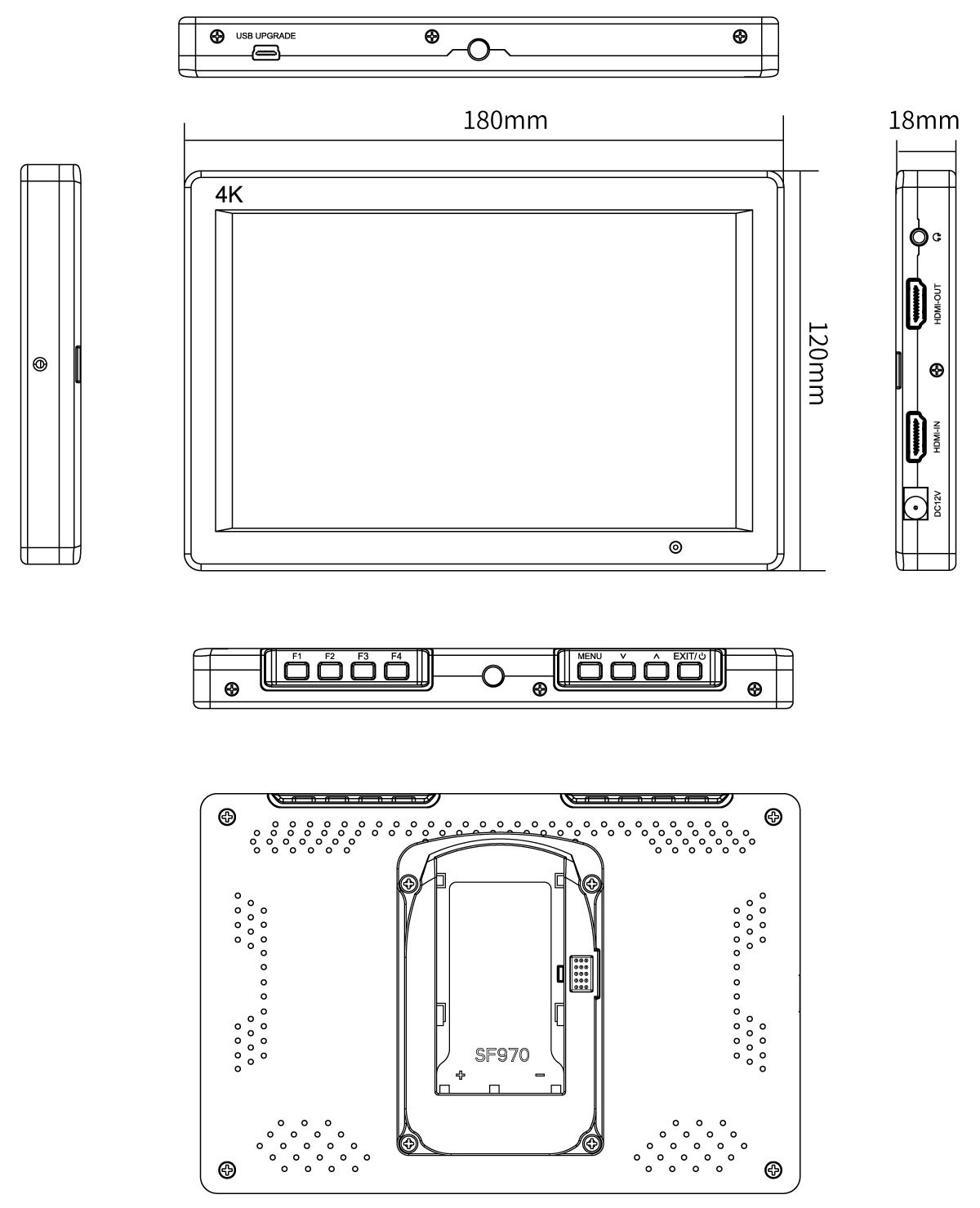
Specially designed to merge portability, and functionality, 18mm thickness 320g the T7 PLUS gives you freedom to shoot well anywhere. See your picture accurately, consistently and clearly, regardless of your position.

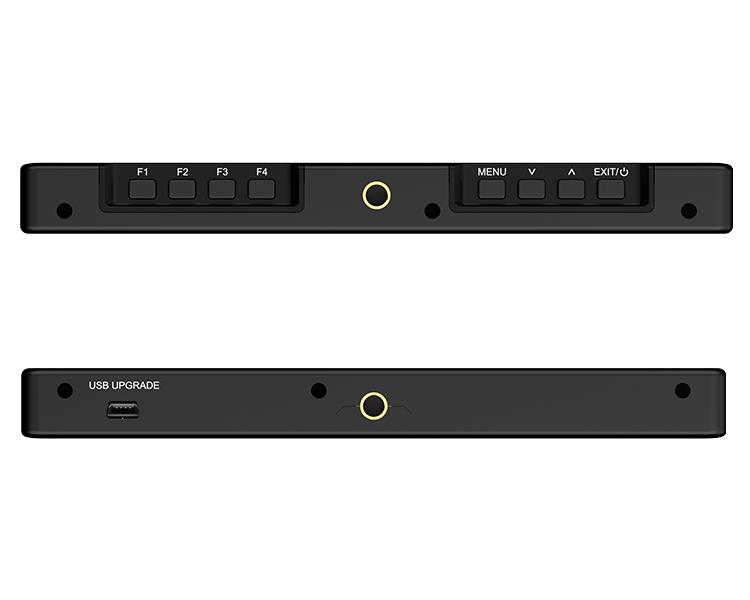
Easy operate button design, allowing you immediately to improve the shooting efficiency. 4 custom shortcut function keys F1~F4, can fast access to the functions you needs, focus assist, false color, exposure, embedded audio etc.

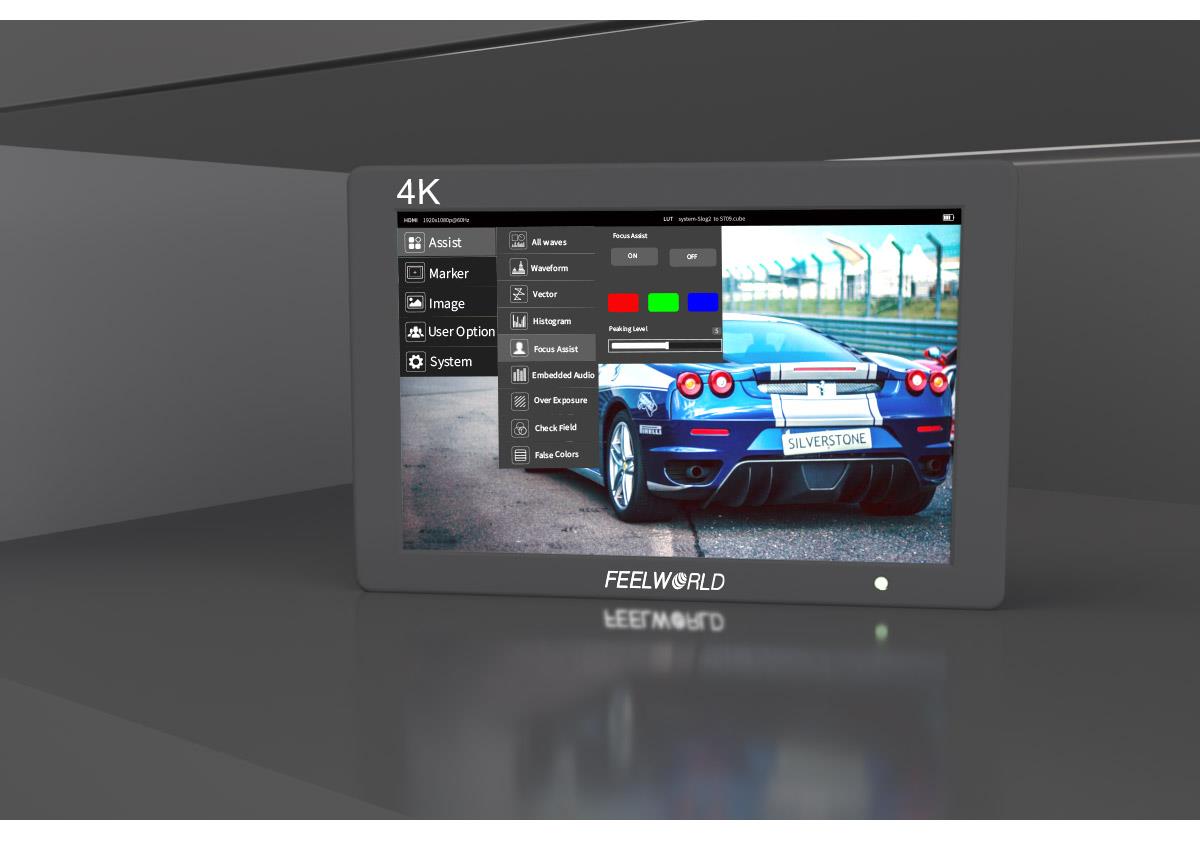
Adopts new UI menu, take the software functions are iconized, it is more convenient and quickly to operate the function.
Use Rec.709 color standard
FEELWORLD uses the professional Rec.709 HD color standard, and uses the color calibration technology, with the professional instrument calibration at the factory, it can achieve monitor calibration efficiently and get accurate color reproduction easily, do not distort the color, show the real image when you shooting video.

FEELWORLD monitor support ITU standards and HD video Rec.709 standard consistent color space, advanced image processing technology, present the clear image and natural color, ensuring accurate color reproduction, to reproduce the physical nature of the shooting, enabling users to accurately evaluate the quality of various input video signals.

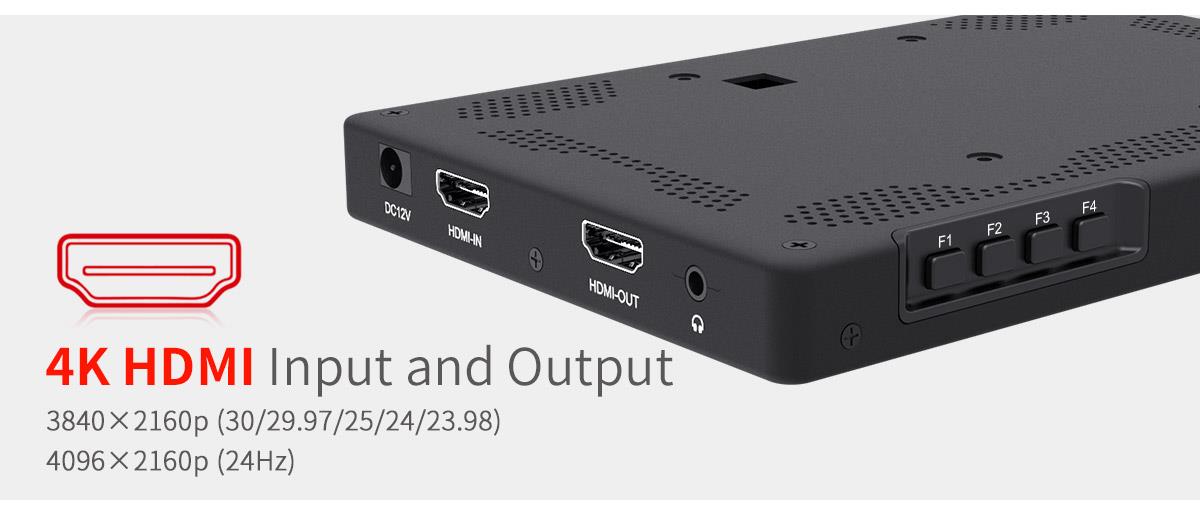
The T7 PLUS supports 4K@30Hz signal input and output, which is transmitting without loss and the screen is clearer. It can connect to director monitor or other displays to display live picture simultaneously.

The T7 PLUS has a flexible battery system that supports F970 battery plate (standard), D28S/D54, LP-E6 and U60 battery plate (optional), and also can powered by power adapter (optional). Note: When you turn off the monitor, you need to press the power button, and you can't pull out the power cable directly.


Our flexible OS is packed with an extensive suite of scopes. The Video OS includes tools for focus, framing & exposure (waveform, RGB parade, vectorscope, RGB histogram, histogram, embedded audio, focus peaking, zoom, zebra, false color, safe frames, etc.) as well as a flexible 3D LUT implementation. Assist users to accurately exposure and focus when shooting, making and playing movies/ videos.

Support to load 32 custom LUTs
The LUT loading function makes the color calibration easier and more intuitive, optimizes the workflow and improves the work efficiency in the early stage of shooting. You could use 4 built-in LOG to Rec.709 video or upload .cube files ( A single file must not exceed 7.9M, supports files with LUT_3D_SIZE of 16, 17, 32, 33, 64, 65). The user stores the LUT document in the root directory of the U flash drive, and imports via connecting the USB adapter cable and the USB interface of the device (up to 32 custom files can be imported), maintaining creative intent, always.

Save your budget
When you need to analyze image quality more accurately than simply looking at the picture then use T7 PLUS's built in waveform monitoring! Choose from waveform (RGB Parade, YUV Parade, Y Parade), vectorscope, histogram, audio phase and level displays, and get broadcast accurate waveform monitoring that shows everything you need to know technically about your video and audio signals. The functions can be opened separately, and also support one key to open all scope mode. T7 PLUS becomes the ideal choice for live production monitoring, so you no longer need to use a separate expensive scopes!

Standard 1/4”-20 mounting thread
The T7 PLUS is equipped with standard 1/4” mounting thread (top and bottom), easy to install on mini hot shoe, magic arm, etc. Combined with image flip function, convenient for filed shooting.

Upper with 180° viewing angle, base with 360° rotation
The standard accessory mini hot shoe mount adapter can quick release and attach to camera monitor, led light, flash, microphone, etc. Upper with 180° viewing angle and base with 360° rotation.

For easier viewing in bright environments. T7 PLUS offers an amazingly clear, bright image indoors or on-location with richer color saturation and contrast.

1. High Resolution: Full HD 1920x1200
2. High Contrast: 1200:1
3. High Brightness: 450cd/m²
4. 160°wide viewing angles IPS Panel
5. Ultra thin design 18mm thickness
6. Custom 3D LUT import (up to 32)
7. All waves
8. Waveform (RGB, Y, YUV)
9. Histogram (RGB1, Y, RGB2)
10. Peaking Focus Assist (Red,Green,Blue three colors optional highlight over parts of the image in focus)
11. False Colors
12. Zebra Exposure
13. Nine Grid
14. Embedded Audio
15. Scan Mode (Under Scan, Over Scan)
16. Zoom (4x,9x,16x)
17. Anamorphic Mode (1.3x, 2.0x, 2.0x mag, User-defined adjustment: 1.20X~2.00X)
18. Pixel to Pixel
19. Center Marker
20. Safe Area (80%,85%,90%,93%,96%,2.35:1)
21. Ratio Marker (4:3,13:9,14:9,15:9,16:9,1.85:1,2.35:1)
22. Marker Color (Red,Green,Blue,White,Black)
23. Check Field (Red/Green/Blue/Mono)
24. Image Flip (H, V, H/V)
25. Image Freeze
26. Zoom All (0~500 adjustable)
27. U/D & L/R Zoom (0~500 adjustable)
28. Color Temperature Adjustment

Brightness Histogram
The Brightness Histogram is a quantitative tool to check the picture brightness.The feature shows the distribution of brightness in an image as graph of brightness along the horizontal axis (Left:Dark, Right:Bright)and a stack of the number of pixels at each level of brightness along the vertical axis.

Embedded Audio Monitoring
The Audio Level Meters provide numerical indicators and headroom levels. It can generate accurate audio level displays to prevent errors during monitoring. The audio meter is green, and will turn yellow when exceeds -20dB, and turn red when exceeds -9dB.

Peaking Focus Assist
The Peaking Filter is used to aid the camera operator in obtaining the sharpest possible picture. When activated, the internal processor will display a colored highlight on the screen where sharp edges appear. You can switch the putline color between red, green, blue according to different tone of the subject.

False Color
The False Color filter is used to aid in the setting of camera exposure. As the camera Iris is adjusted, elements of the image will change color based on the luminance or brightness values. This enables proper exposure to be achieved without the use of costly, complicated external test equipment.

Exposure (zebras)
The Exposure is used to assist in exposure adjustment in the mode of Zebra Pattern. It is considered overexposed and displays the moving warning lines onto the over exposed areas. 1-100IRE adjustable.

Check Field
Check Field is an assistant function to adjust camera color settings. Under the check field mode, you can use red, green, blue or mono pixels to generate the image, because hue and saturation can be adjusted more quickly and accurately in this environment.

Zoom In (4X, 9X, 16X)
Image magnification is HD signal in any part, an amplification for high quality close-up.
.jpg)
Anamorphic Mode (1.3x, 2.0x, 2.0x mag, User)
You can choose 1.3x, 2.0x, 2.0x mag, User-defined adjustment: 1.20x~2.00x. Built-in selection of no squeeze, 1.3× or 2.0× allows you to use anamorphic lenses or adapters and see the image unsqueezed, even if your camera does not de-squeeze in camera. A 2.0× mag mode, magnifies the center of your image so you can check the focus of your scaled image.

Image Flip
The Horizontal,Vertical and Hor&Ver of the image around flip.

Nine Grid
Nine Grid Zoom: Zoom one of the images to realize the full screen. You can switch the Mark color between Red, Green, Blue, White, Black according to different tone of the subject.

Pixel to Pixel
Enable the filmmaker to check the image from the 1:1 signal source without scaling.This feature is essential for capturing optimum detail.

Center Marker & Safe Marker
Safe Mark for View Finding and Composition (80%, 85%, 90%, 93%, 96%, 2.35:1). You can switch the Mark color between Red, Green, Blue, White and Black according to different tone of the subject.


Ratio Marker
(4:3, 13:9, 14:9, 15:9, 16:9, 1.85:1, 2.35:1). Frame blanking zone includes 6 Levels, from 0-6 (Transparent to Black). You can switch the Mark color between red, green, blue, white and black according to different tone of the subject.

| Model | T7 PLUS |
| Screen Size | 7" IPS |
| Resolution | 1920x1200 pixels |
| Pixel Pitch | 0.07875 (H) x 0.07875 (W) (mm) |
| Aspect Ratio | 16:10 |
| Brightness | 450cd/m² |
| Contrast Ratio | 1200:1 |
| Backlight | LED |
| Viewing Angle | 80°/80°(L/R) 80°/80°(U/D) |
| 1 X HDMI | HDMI |
| 1 X HDMI | HDMI |
| Audio | Stereo Headphone, Speaker |
| 480i/576i/480p/576p |
| 1080i (60/59.94/50) |
| 720p (60/59.94/50/30/29/25/24/23.98) |
| 1080p (60/59.94/50/30/29.97/25/24/24sF/23.98/ 23.98sF) |
|
4K UHD 3840×2160p (30/29.97/25/24/23.98Hz), 4096×2160p (24Hz)
|
| Input Voltage | DC7~24V |
| Power Consumption | ≤8W |
| Working Temperature | -20°C~55°C |
| Storage Temperature | -30°C~65°C |
| Install Way | 1/4"-20 Thread Socket (top, bottom) |
| Battery Plate | F970 (Standard); D28S/D54, LP-E6, U60 (Optional) |
| Unit Size | 180Lx120Hx18D (mm) |
| Unit Weight | 320g/350g (With F970 Plate) |
| * All waves |
| * Waveform (RGB, Y, YUV) |
| * Histogram (RGB1, Y, RGB2) |
| * Embedded Audio |
| * Peaking Focus Assist (Red, Green, Blue three colors optional highlight over parts of the image in focus) |
| * False Colors |
| * Zebra Exposure (1-100IRE adjustable) |
| * Check Field (Red, Green, Blue, Mono) |
| * Scan Mode (Under Scan, Over Scan) |
| * Anamorphic Mode (1.3x, 2.0x, 2.0x mag) |
| * Image Flip (H, V, H/V) |
| * Image Freeze |
| * Center Marker |
| * Screen Marker (80%,85%,90%,93%,96%, 2.35:1) |
| * Ratio Marker (4:3,13:9,14:9,15:9,16:9,1.85:1,2.35:1) |
| * Color Temperature Adjustment |
| * Nine Grid (Nine Grid Zoom: zoom one of the images to realize the full screen) |
| * Zoom (4X, 9X, 16X) |
| * Scan Mode (Under Scan, Over Scan) |
| * Pixel to Pixel |
| * Zoom All |
| * U/D Zoom |
| * L/R Zoom |
Add FEELWORLD monitor to your studio camera
FEELWORLD T7 PLUS portable design with professional features, easy to set up and check your shots,widely use for shooting movies, field photography,broadcast,fashion, micro-film, wedding records, party pictures,television advertising, etc.

1× Monitor
1× Mini HDMI Cable
1× USB Adapter Cable
1× Sunshade
1× Mini Hot Shoe Mount+Hex Wrench
1× F970 Battery Plate
1× Operation Manual


