



| Number: | 202303301130251552 |
|---|---|
| Model: | LUT6E |
| Size: | 6" |
| Introduction: |
Screen Size: 6" IPS Resolution: 1920x1080 pixels Aspect ratio: 16:9 Brightness: 1600cd/m² |
| Input: | HDMI |
| Output: | HDMI, DC OUT 8.4V, Stereo Headphone |
| DM: | |
| Download: | |


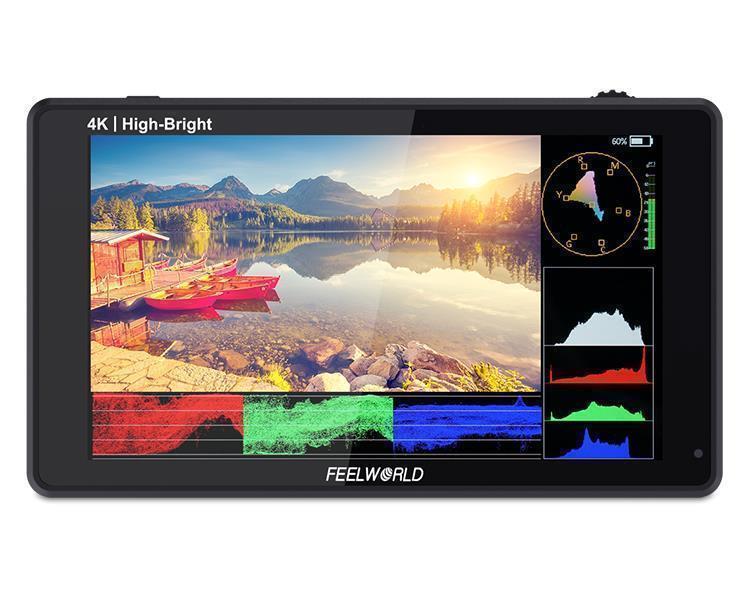
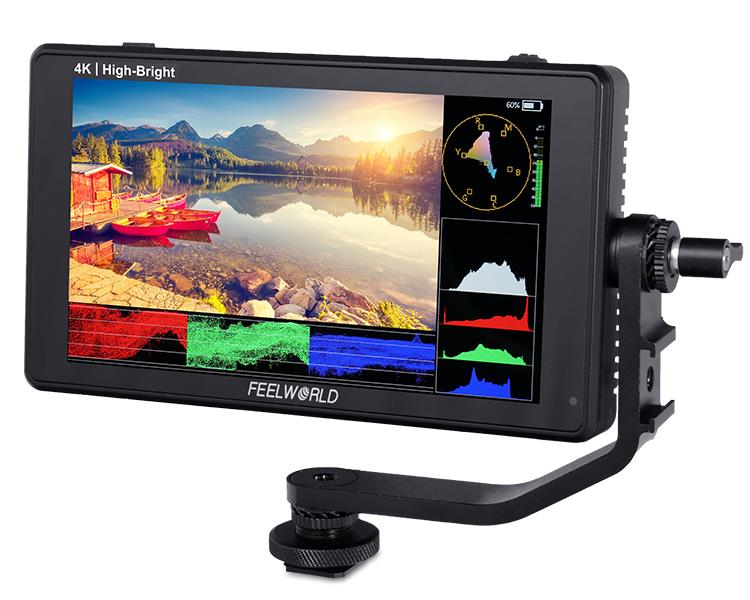
FEELWORLD LUT6E is a 6-inch field monitor with 1600nits brightness, the screen visible even in sunlight. The compact size and lightweight design let it suitable for movable shooting on set. Equipped with HDMI input and output support up to 4K@30Hz, and a series professional composition tools, ideal choice for photographer and content creator.

Viewing clearly and capture every detail with confidence
6-inch LCD screen with 1920x1080 resolution, clear and delicate image, high color reproduction. 1600nit high brightness, clarity visible in the sun light; The wide 160º viewing angle makes it easy for multiple members of the team monitoring at the same time.

LUT6E adopts new UI menu, take the software functions are iconized, it is more convenient and quickly to operate the function.

LUT6E built-in up to 11 languages, meet the different needed.

Easy and sensitive operation, make your shooting more efficiency
The innovative touch screen LCD user interface provides incredible control. You can use simple tap and swipe gestures for the important monitoring functions.

1.When the monitor and touch are both on, continuously click the screen twice to enter the main menu.
2. Swipe up from the bottom of the screen to open the shortcut menu and click on the corresponding menu to open or set the corresponding function. Double-click the shortcut menu function and select the function setting with the "<" or ">" key.
3. On the left side of the screen (1/2 split screen), you can directly adjust the brightness of the screen backlight; on the right side of the screen (1/2 split screen), you can directly adjust the volume.
4. Click any space beside the menu to exit.

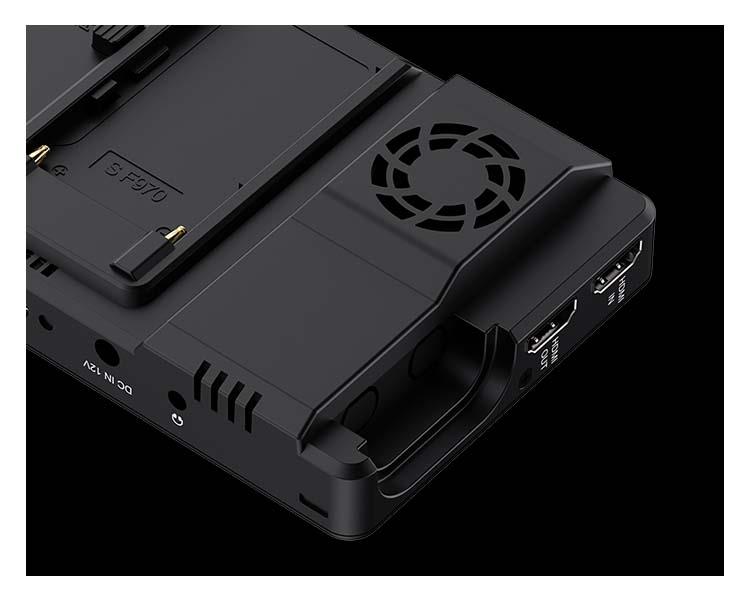
LUT6Ecomes with HDMI input and output supports up to 4K@30Hz. You can connect it to any consumer camera or even DSLR cameras. Display live video or expand display on external screens or projectors via loop out , and with embedded audio, enable the multi-position simultaneous monitoring. You can also monitor audio using the 3.5mm stereo headphone jack.
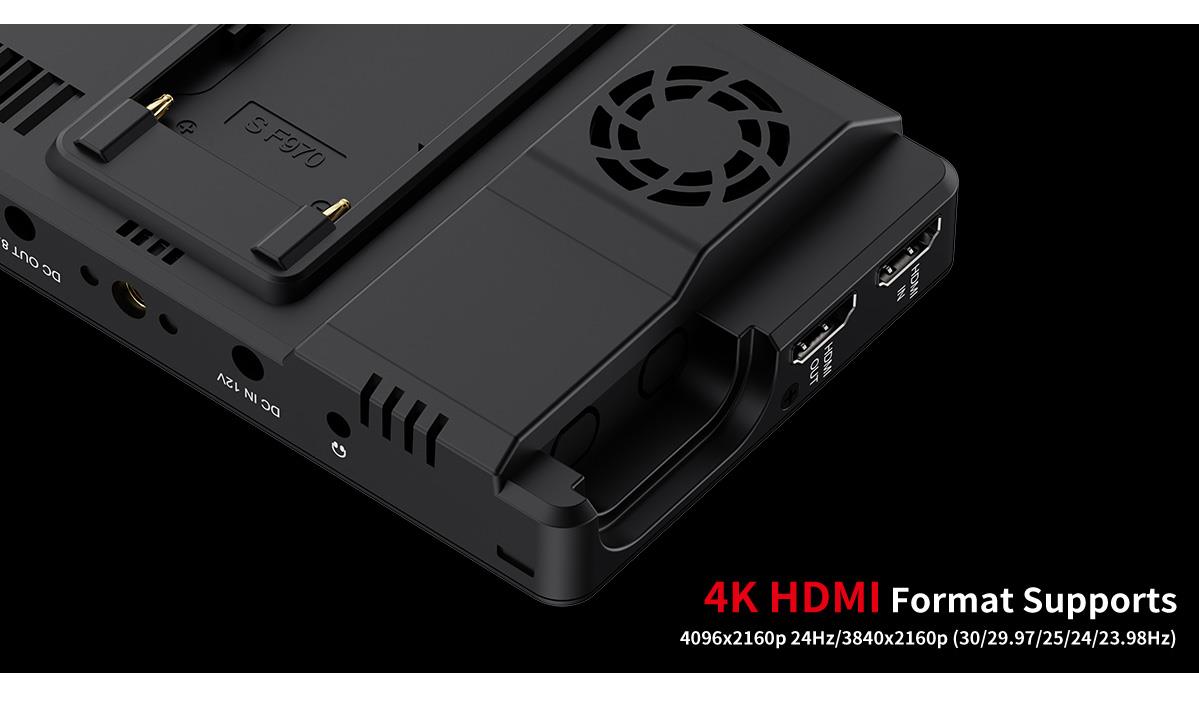
LUT6E provides auxiliary power out (DC OUT 8.4V) allowing shooters to power their cameras. With a battery adapter cable (Optional), the LUT6E extends camera run-time, while providing a more usable display.
Barrel output for powering your camera with a separately available DC coupler via adapter (NP-FW50 Sony & LP-E6 Canon & DMW-BLF19 Panasonic). More adapters coming soon.
Note: since different brands and models of cameras require different power for normal operation, the camera may not be able to take pictures or video normally. Therefore, when using batteries to power the monitor, in order to use the camera normally, it is recommended to use a large-capacity fully charged battery.

Long-lasting power for your shooting
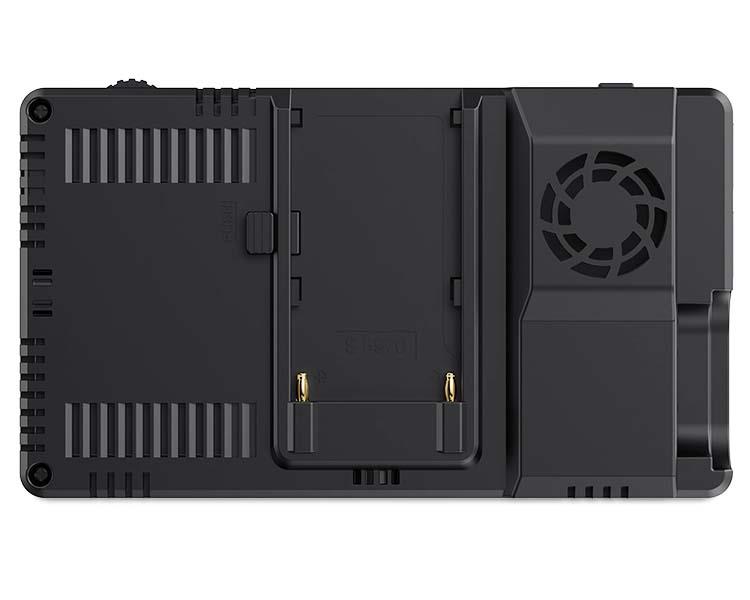
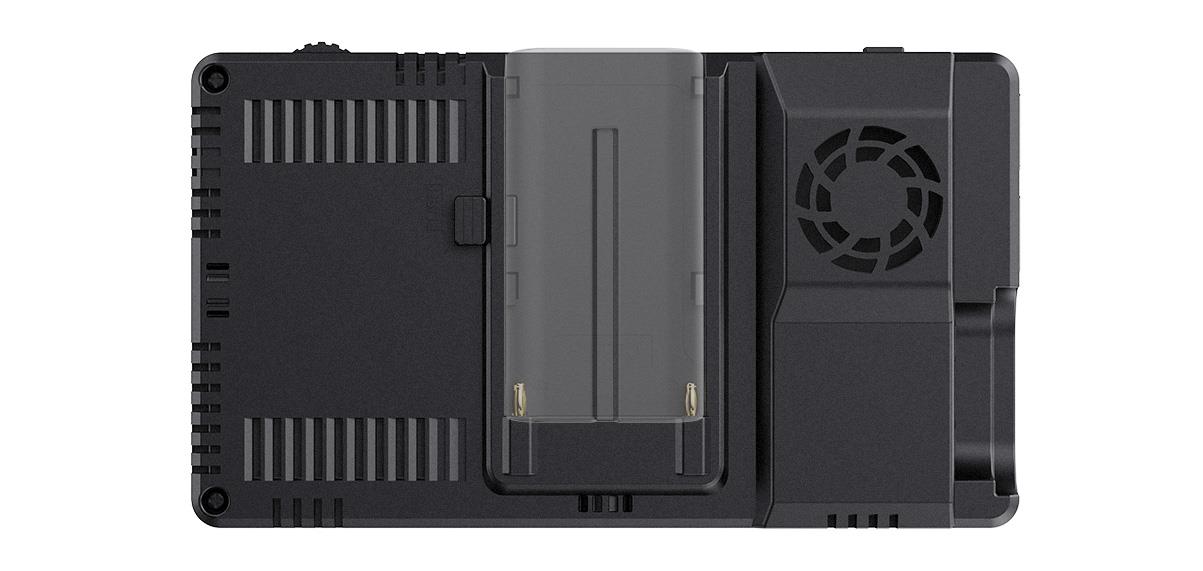
Except DC 12V power input (suitable use 1.5A power adapter), LUT6E also provides Sony F970 battery plate to power by NP-F battery for option.
● Compatible Sony Battery: F970 F960 F950 F930 F770 F750 F730 F570 F550 F530 series. We recommend you use the standard Sony F970 battery. Such as used the F970 battery (7.4V 6600mah), the monitor can working about 5 hours.
Note: The battery is not included. Different specifications of the battery have different capability. The working time for the monitor will be different. Higher capability (working time) will be longer. The battery not including, please purchase separately.

Our flexible OS is packed with an extensive suite of scopes, all 1-touch away and simple to use. The Video OS includes tools for focus, framing & exposure (waveform, RGB parade, vector scope, RGB histogram, histogram, embedded audio, focus peaking, zoom, zebra, false color, safe frames, etc.) as well as a flexible 3D LUT implementation (use built-in LOG to Rec.709 video or upload .cube files) and options for anamorphic de-squeeze monitoring.

Supports up to load 32 custom LUTs
3D-LUT is a table for quickly looking up and output specific color data. By loading different 3D-LUT tables, it can quickly recombine color tone to form different color styles. Built-in 4 DE-log LUT , you also can load the custom .cube file via SD Card(up to load 32).

What you see is what you get
Compare the normal image, HDR provides stunning dynamic range and image details. Built-in HLG mode.

Save your budget
When you need to analyze image quality more accurately than simply looking at the picture then use LUT6E's built in waveform monitoring! Choose from waveform (RGB Parade, YUV Parade, Y Parade), vectorscope, histogram, audio phase and level displays, and get broadcast accurate waveform monitoring that shows everything you need to know technically about your video and audio signals. The functions can be opened separately, and also support one key to open all scope mode. LUT6E becomes the ideal choice for live production monitoring, so you no longer need to use a separate expensive scopes!

Meet your diverse need of monitoring
The monitor is equipped with 2 standard 1/4”mounting threads (bottom, right side), you can easily mount it on the camera or other types of equipment with a magic arm, bracket, etc.. Whether it is horizontal or vertical shooting, you can accurately monitor.

The monitor attached a cold shoe mounted Tilt Arm. Shooters will have a secure way to position their monitor while maintaining a low profile.
• The LUT6E monitor can be rotated 360 degree with two different ways, for viewing convenience. (1.The monitor can be rotated 360 degree from up to down through the side mounting point of tilt arm; 2. The monitor can be rotated 360 degree from left to right through the bottom mounting point of tilt arm).
•Secure and lightweight mounting via shoe mount or 1/4"-20 thread
• Includes a shoe mount of its own for accessories like a microphone, LED light, or wireless receiver, etc.
• There are two small dots on the tilt arm, which are aligned with the monitor for installation, the connection is more stable, just grab the monitor to rotate without loosening the screws.

* 1920x1080 full HD IPS screen, 1600nits daylight viewable
* Touch screen + new menu interface, improve shooting efficient
* User custom 3D LUT, recreate film look(up to 32)
* HDR monitoring, what you see is what you get
* HDMI input and output, support up to 4K@30Hz
* With Waveform, Vector scope, Histogram, Focus Assist, Monochrome etc. functions, can help you accurately exposure and focus every shot.
* Stereo Earphone output
* DC 8.4V power out to power your DSLR camera or mirrorless camera
Waveform / Vector scope / Histogram
This essential feature assists with the calibration of professional video cameras. It shows the overall brightness of the image assisting the video professional in correcting exposure. The waveform feature also checks the evenness of the lighting when lighting a chromakey or background.

Vector scope shows how saturated the image is and where the pixels in the image land on the color spectrum. It can also be displayed in various sizes & positions, that allows users to monitor color gamut range in real time.

The Brightness Histogram is a quantitative tool to check the picture brightness.The feature shows the distribution of brightness in an image as graph of brightness along the horizontal axis (Left:Dark, Right:Bright)and a stack of the number of pixels at each level of brightness along the vertical axis.

RGB histogram is a graphical display of the distribution of tones, shows the Red, Green and Blue channels histograms. Suitable for HD-SDI and HDMI signal monitoring.

Audio Meter Monitoring
The Audio Level Meters provide numerical indicators and headroom levels. It can generate accurate audio level displays to prevent errors during monitoring. Under HDMI audio, 2 channels audio displays are supported..

Peaking Focus Assist
The Peaking Filter is used to aid the camera operator in obtaining the sharpest possible picture. When activated, the internal processor will display a colored highlight on the screen where sharp edges appear. You can switch the putline color between red, green, blue according to different tone of the subject.

False Color
The False Color filter is used to aid in the setting of camera exposure. As the camera Iris is adjusted, elements of the image will change color based on the luminance or brightness values. This enables proper exposure to be achieved without the use of costly, complicated external test equipment.

Exposure (zebras)
The Exposure is used to assist in exposure adjustment in the mode of Zebra Pattern. It is considered overexposed and displays the moving warning lines onto the over exposed areas. 10-100IRE adjustable.

Check Field
Check Field is an assistant function to adjust camera color settings. Under the check field mode, you can use red, green, blue or mono pixels to generate the image, because hue and saturation can be adjusted more quickly and accurately in this environment.

Zoom In (2X, 4X, 9X, 16X)
Image magnification is HD signal in any part, an amplification for high quality close-up.

Anamorphic Mode (1.33x, 1.6x, 2.0x, 2.0x mag, User)
You can choose 1.33x, 1.6x, 2.0x, 2.0x mag, User-defined adjustment: 1.20x~2.00x. Built-in selection of no squeeze, 1.33× or 2.0× allows you to use anamorphic lenses or adapters and see the image unsqueezed, even if your camera does not de-squeeze in camera. A 2.0× mag mode, magnifies the center of your image so you can check the focus of your scaled image.

Image Flip
Image flip is to flip the image horizontally, vertically, and horizontally/vertically. Simultaneously turning on the horizontally flip and the vertical flip can achieve horizontal/vertical simultaneous flipping.

Grid
Grid is the most common and basic composition method. The area of the picture can be divided into 4, 9, 16, 25, 36, 49, 64, 81 equal grids.

Pixel to Pixel
Enable the filmmaker to check the image from the 1:1 signal source without scaling.This feature is essential for capturing optimum detail.

Center Marker & Safety Marker
Safety Marker for View Finding and Composition (80%、85%、90%、93%、96%、2.35:1). You can switch the Mark color between Red, Green, Blue, Black, White, Gray according to different tone of the subject.


Ratio Marker
There are a variety of ratio marker (4:3, 13:9, 14:9, 15:9, 16:9, 1.85:1, 2.35:1). You can switch the marker colors between Red, Green, Blue, Black, White, Gray according to different tone of the subject.

| Model | LUT6E |
| Screen Size | 6" IPS |
| Resolution | 1920x1080 pixels |
| Pixel Pitch | 0.069 (L) x 0.069 (W) (mm) |
| Aspect Ratio | 16:9 |
| Brightness | 1600cd/m² |
| Contrast Ratio | 1000:1 |
| Backlight | LED |
| Viewing Angle | 80°/80°(L/R) 80°/80°(U/D) |
| 1 X HDMI | HDMI |
| 1 X HDMI | HDMI |
| 1 X DC | Barrel (5.5mm outer, 2.1mm inner) barrel output for powering cameras via camera specific adaptor. |
| Audio | 3.5mm Stereo Headphone |
| 480i/576i/480p/576p |
| 1080i (60/59.94/50) |
| 720p (60/59.94/50/30/29.97/25/24/23.98) |
| 1080p (60/59.94/50/30/29.97/25/24/23.98) |
| 3840x2160p (30/29.97/25/24/23.98) |
|
4096×2160p (30/29.97/25/24/23.98)
|
| Input Voltage | DC7~24V |
| Power Consumption | ≤10W |
| Working Temperature | -20°C~50°C |
| Storage Temperature | -30°C~60°C |
| Install Way | 1/4"-20 Thread Socket (Right, Bottom) |
| Battery Plate | F970 Battery Plate |
| Unit Size | 162Lx93.2Hx29D(mm) |
| Unit Weight | 300g |
| Color Box Size | 186L*124W*80H(mm) |
| Outer Carton Qty | 10 |
| Outer Carton Size | 465*200*326 (mm) |
| Gross Weight | 7.6kgs |
| * Support 3D LUT Log to Rec.709, user 3D LUT Upload |
| * Support Touch Menu |
| * Parade (RGB, YUV, Y) |
| *All Waves |
| *Vector |
| *RGB Histogram |
| *Brightness Histogram |
| * Embedded Audio |
| *Peaking Focus (red, green, blue, white, yellow five peaking colors optional; 1~10 peaking level adjustable) |
| *False Colors (Normal, ARRI) |
| *Zebra Exposure (10%~100% adjustable) |
| *Check Field (Red, Green, Blue, Gray) |
| *Scan Mode (Under Scan, Over Scan) |
| * Anamorphic Mode (1.33X、1.6X、2.0X、2.0X MAG) |
| *Image Flip (H, V, H/V) |
| *Image Freeze |
| *Center Marker |
| * Safety Marker (80%、85%、90%、93%、96%、2.35:1) |
| * Ratio Marker (4:3、13:9、14:9、15:9、16:9、1.85:1、2.35:1) |
| * Marker Color (red, green, blue, white, black, gray) |
| *Color Temperature Adjustment (5600K,6500K,9300K |
| *Grid (2x2,3x3,4x4,5x5,6x6,7x7,8x8,9x9) |
| * Zoom Mode (2X,4X,9X,16X) |
| * Aspect Ratio |
| * Pixel to Pixel |
1× Mini/ Micro HDMI to HDMI Cable
1× Tilt Arm
1× Manual


