


| Number: | 201905300851401455 |
|---|---|
| Model: | F6 PLUS |
| Size: | 5.5" IPS |
| Introduction: |
Screen Size: 5.5" Touch Screen Resolution: 1920x1080 pixels Aspect ratio: 16:9 Brightness: 500cd/m² |
| Input: | 4K HDMI, SD Slot, Type-C |
| Output: | 4K HDMI, Stereo Headphone, DC OUT 8V, Barrel (5.5mm outer, 2.1mm inner; Power DSLR or mirrorless camera) |
| DM: | |
| Download: | |
In order to improve customer experience, we upgrade the F6 plus both firmware and software.
1. Interface add DC 5V input: Type-C, you can flexible use mobile phone powerbank to power monitor.
2. The advance feature add: Waveform, Vector scope, Auto Mirror, Nine Grid, False Color (type2).
The F6 Plus old version without Type C version can update the firmware with Waveform, Vector scope, Nine Grid, False Color (Type2).
Here the F6 plus firmware update link (Only for old version F6 PLUS without Type-C interface): https:/feelworld.ltd/blogs/news/without-type-c-feelworld-f6-plus-firmware-update-latest-version-1-2-2-upgrade
Here the F6 plus with TYPE-C interface update link (Latest Version2.5.1_5.5) : https://feelworld.ltd/blogs/news/feelworld-f6-plus-is-type-c-version-firmware-update-latest-version-2-2-0-upgrade


The F6 PLUS keeps the original great: it's small, lightweight and has great image quality. In addition, it now features the touch screen and has the ability to import 3D LUTs via the SD card. The F6 PLUS is the perfect monitor for those who need an easy-to-use lightweight on-camera monitor such as gimbal operators, or shooters that are always on the go.
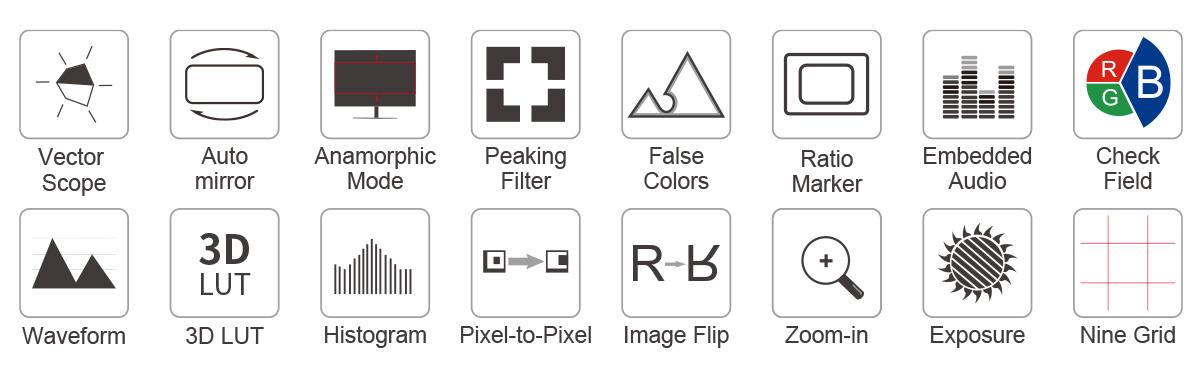
Its touchscreen conveniently allows you to zoom your image with a pinch gesture and tap to access the menu settings. There are also a variety of onscreen tools to help you set up your shots, including parade (RGB, YUV, Y), vector, histogram, peaking, embedded audio, exposure, false color, nine grid, auto mirror, zoom, guides, pixel-to-pixel, anamorphic mode, image freeze and more.
The F6 PLUS is 5.5 inch and only 235g, and makes it the ideal size and weight for field production. The entire monitor’s build is sturdy and compact, allowing you to easily mount it to your DSLR camera or even a gimbal stabilizer. It gives you the freedom to shoot well anywhere.


The 5.5" IPS screen features a 1920 x 1080 resolution, packing 400 pixels per inch and provides a wide viewing angle of 160° and for easier off-axis position monitoring. Built-in 3D LUT color calibration, which complies with the standard of REC-709, can calibrate each monitors so that it can eliminate the trouble of color cast.


OCR Full-fit Screen Design
The monitor uses OCR full-fit technology and high-strength, scratch-resistant, impact-resistant glass.
Use simple tap and swipe gestures to make adjustments!
The built-in monitor is also an interactive touchscreen that makes setting up the F6 PLUS incredibly intuitive. All of the functions are at your fingertips, allowing you to use simple tap and swipe gestures to change function settings. You can easily and intuitively zoom in and out of your shot with the pinch-to-zoom gesture.

●You can also get a quick glance at your menu settings and features with an easy tap on the screen.
●It also supports physical buttons control. Tap/Rotate the wheel button for quick selection and function settings.
●Tap the power switch to turn off the touch function, designed to prevent misuse.

User LUT cube import
F6 PLUS provides S-log2/3, V-log, Log-C etc, to convert log mode to REC709 for all major cameras. The LUT loading function makes the color calibration work of the previous shooting easier and more intuitive, optimizes the workflow and improves work efficiency. User creative 3D LUT cube or calibration 3D LUT cube can be uploaded to F6 PLUS by SD card.

What you see is what you get
F6 PLUS has built-in HLG 2020, HLG 709, HLG P3 HDR 3D LUT, and Rec709 De-slog3 LUTs, includes SLOG2, SLOG3, LOGC, VLOG. The monitor can display an HDR (high dynamic range) signal for incredible clarity and detail, simplify the complexities of shooting Log and HDR, helping you to replicate post-production workflows at the moment when it matters most–while shooting.


When you need to analyze image quality more accurately than simply looking at the picture then use F6 PLUS's built in waveform monitoring! Choose from waveform (RGB Parade, Y Parade), vectorscope, histogram and audio phase and level displays, and get broadcast accurate waveform monitoring that shows everything you need to know technically about your video and audio signals. The functions can be opened separately, and also support one key to open all scope mode. F6 PLUS is perfect for live production monitoring and removes the need for separate expensive scopes!

The F6 PLUS has 4K HDMI in and loop-out, allowing it to not only display live signals, but also send them out to other monitors simultaneously. It's the ability to display live picture on multiple displays at once while still maintaining the original video quality. Plus, you can monitor audio using the 3.5mm stereo headphone jack.


Connect to Wireless Transmitter
Transmission to film crew director monitoring at the same time. Without the cable more flexible to transition between scenes effortlessly for outdoor shooting.

Display live picture on multiple displays simultaneously.

At the concert, live broadcast, conference, you can connect to project display real-time images.

The FEELWORLD F6 PLUS is an ideal camera-top monitor for DSLR and mirrorless camera shooters. Because the F6 PLUS provides auxiliary power out; allowing shooters to power their cameras. With a battery adapter cable (Optional), the F6 PLUS extends camera run-time, while providing a more usable display.

In addition to the power supply through the battery plates and 12V DC power input(can be using 12V/1.5A adapter), it also supports 5V Type-C input, which can be powered by mobile phone charger or power bank. (At least 5V/2A)
Note: The 5V Type-C port is only used for power supply, not for data transmission, and cannot provide loop-out power.

Compatibility with Sony F970 and Canon LP-E6 of lithium batteries for one battery plate. Providing long-time working condition for cameraman in shooting applications.

Every F6 PLUS monitor will ship with a cold shoe mounted Tilt Arm. Shooters will have a secure way to position their monitor while maintaining a low profile.
• Allows the F6 PLUS monitor to rotate 360 degrees for viewing convenience
• Secure and lightweight mounting via shoe mount or 1/4"-20 thread
• Includes a shoe mount of its own for accessories like a microphone, LED light, or wireless receiver, etc.

To convenient the various angles monitoring
FEELWORLD F6 PLUS features standard 1/4" mount points (top, bottom, right) for attaching it to cameras and rigs. Not only you can install it on a monitor through tilt arm, but also you can mount it on a handheld stabilizer or securely attach it to the top of your camera as the ultimate HD viewfinder! If you install it on the bottom of the device, you can also combine the image flip function to maintain the correct orientation of the screen!


The F6 PLUS monitor is equipped with a sunshade, which allows the photographer to focus more on the video and avoid the interference of strong light, providing a better visual experience. The installation process is simple and fast, which is very suitable for outdoor shooting.

* Support 3D LUT Log to Rec.709, user 3D LUT Upload
* Support Touch Menu
* High Resolution: Full HD 1920x1080, High Contrast: 1000:1
* 160° wide viewing angles IPS Panel
* Provides auxiliary power out; allowing shooters to power their cameras
* Support HDR monitoring
* Parade (RGB, YUV, Y)
* VectorScope
* Histogram
* Peaking Focus Assist (red, green,blue, white, yellow five peaking colors optional; 1~10 peaking level adjustable)
* False Colors
* Zebra Exposure (1%~100% adjustable)
* Scan Mode (Under Scan, Over Scan)
* Zoom (100%~300%)
* Anamorphic Mode (1.25x, 1.33x, 1.5x, 2.0x, 2.0x mag)
* Pixel to Pixel
* Nine Grid
* Center Marker
* Safety Marker (70%, 80%, 90%, 16:9, 16:10, 4:3, 5:4, 1.85:1, 2.35:1)
* Ratio Marker (16:9, 16:10, 4:3, 1.85:1, 2.35:1)
* Marker Color (red, green, blue, white, black, yellow)
* Check Field (red, green, blue, gray)
* Image Flip (H, V, H/V)
* Image Freeze
* Color Temperature Adjustment

User LUT Cube Import
F6 PLUS provides S-log2/3, V-log, Log-C etc, to convert log mode to REC709 for all major cameras. The LUT loading function makes the color calibration work of the previous shooting easier and more intuitive, optimizes the workflow and improves work efficiency. User creative 3D LUT cube or calibration 3D LUT cube can be uploaded to F6 PLUS by SD card.

Waveform / Vector scope / Histogram
This essential feature assists with the calibration of professional video cameras. It shows the overall brightness of the image assisting the video professional in correcting exposure. The waveform feature also checks the evenness of the lighting when lighting a chromakey or background.

Vector scope shows how saturated the image is and where the pixels in the image land on the color spectrum. It can also be displayed in various sizes & positions, that allows users to monitor color gamut range in real time.

The Brightness Histogram is a quantitative tool to check the picture brightness.The feature shows the distribution of brightness in an image as graph of brightness along the horizontal axis (Left:Dark, Right:Bright)and a stack of the number of pixels at each level of brightness along the vertical axis.

This mode shrinks your video image to approximately the size of a 5.5" display and tiles your choice of waveform, vectorscope, histogram, and embedded audio on the border of your video.

Audio Meter Monitoring
The Audio Level Meters provide numerical indicators and headroom levels. It can generate accurate audio level displays to prevent errors during monitoring. Below -18dB column shows green; -18dB~-08dB column shows yellow; above -08dB shows red.

Peaking Focus Assist
The Peaking Filter is used to aid the camera operator in obtaining the sharpest possible picture. When activated, the internal processor will display a colored highlight on the screen where sharp edges appear. You can switch the peaking color between yellow, red, green, blue, white according to different tone of the subject. The focus level can be adjusted from 1 to 10 levels.

False Color
The False Color filter is used to aid in the setting of camera exposure. As the camera Iris is adjusted, elements of the image will change color based on the luminance or brightness values. This enables proper exposure to be achieved without the use of costly, complicated external test equipment.

Exposure (zebras)
The Exposure is used to assist in exposure adjustment in the mode of Zebra Pattern. It is considered overexposed and displays the moving warning lines onto the over exposed areas. There is a 1%-100% zebra value that can be adjusted.

Check Field
Check Field is an assistant function to adjust camera color settings. Under the check field mode, you can use red, green, blue or gray pixels to generate the image, because hue and saturation can be adjusted more quickly and accurately in this environment.

Zoom In (100%~300%)
Image magnification is HD signal in any part, an amplification for high quality close-up. The touch panel can help you zoom in quickly, zoom out and move the image after zooming in.

Anamorphic Mode
Built-in selection of no squeeze, 1.25x, 1.33x, 1.5x, 2.0x or 2.0x mag allows you to use anamorphic lenses or adapters and see the image unsqueezed, even if your camera does not de-squeeze in camera.

Image Flip
Image flip is to flip the image horizontally, vertically, and horizontally/vertically. Simultaneously turning on the horizontally flip and the vertical flip can achieve horizontal/vertical simultaneous flipping.

Auto Mirror
After auto-mirror is turned on, rotate the monitor vertically, and the picture will be adjusted upside down automatically.

Nine Grid
Nine grid is the most common and basic composition method. The area of the picture is divided into nine equal grids.

Pixel to Pixel
Enable the filmmaker to check the image from the 1:1 signal source without scaling.This feature is essential for capturing optimum detail.

Center Marker & Safety Marker
Safety Marker for View Finding and Composition (70%, 80%, 90%, 16:9, 16:10, 4:3, 5:4, 1.85:1, 2.35:1). You can switch the Mark color between Yellow, Red, Green, Blue, White and Black according to different tone of the subject.


Ratio Marker
There are a variety of ratio marker (16:9, 16:10, 4:3, 1.85:1, 2.35:1); the transparency of the ratio marker has 4 display effects optional (0%, 25%, 50%, 75%). You can switch the marker colors between yellow, red, green, blue, white and black according to different tone of the subject.

| Model | F6 PLUS |
| Screen Size | 5.5" Touch Screen |
| Resolution | 1920x1080 pixels |
| Pixel Pitch | 0.0639 (H) x 0.0213 (W) mm |
| Aspect Ratio | 16:9 |
| Brightness | 500cd/m² |
| Contrast Ratio | 1000:1 |
| Backlight | LED |
| Viewing Angle | 80°/80°(L/R) 80°/80°(U/D) |
| 1 X HDMI | HDMI |
| 1 X Type-C | Type-C |
| 1 X HDMI | HDMI |
| 1 X DC Output | DC Output |
| Audio | 3.5mm Stereo Headphone |
| 480i/576i/480p/576p |
| 1080i (60/59.94/50) |
| 720p (60/59.94/50/30/29/25/24/23.98) |
| 1080p (60/59.94/50/30/29.97/25/24/24sF/23.98/ 23.98sF) |
|
4K UHD 3840×2160p (30/29.97/25/24/23.98Hz), 4096×2160p (24Hz)
|
| Input Voltage | DC7~24V |
| Power Consumption | ≤9W |
| Power Connector | DC |
| Working Temperature | -20°C~55°C |
| Storage Temperature | -30°C~65°C |
| Install Way | ¼-20 thread points (top, bottom, right) |
| Unit Size | 148Lx93Hx20D (mm) |
| Unit Weight | 235g |
| Color Box Size | 186L*124W*80H(mm) |
| Outer Carton Qty | 10 |
| Outer Carton Size | 465*200*326 (mm) |
| Gross Weight | 7.2kgs |
| * Support 3D LUT Log to Rec.709, user 3D LUT Upload |
| * Support Touch Menu |
| * All Waves |
| * Parade (RGB, YUV, Y) |
| * Vector |
| * Brightness Histogram |
| * Peaking Focus Assist (red, green,blue, white, yellow five peaking colors optional; 1~10 peaking level adjustable) |
| * False Colors |
| * Zebra Exposure (1%~100% adjustable) |
| * Check Field (red, green, blue, gray) |
| * Scan Mode (Under Scan, Over Scan) |
| * Anamorphic Mode (1.25x, 1.33x, 1.5x, 2.0x, 2.0x mag) |
| * *Flip H/ Flip V (All open, H/V flip) |
| * Image Freeze |
| * Nine Grid |
| * Center Marker |
| * Safety Marker (70%, 80%, 90%, 16:9, 16:10, 4:3, 5:4, 1.85:1, 2.35:1) |
| * Marker Color (red, green, blue, white, black, yellow) |
| * Ratio Marker (16:9, 16:10, 4:3, 1.85:1, 2.35:1) |
| * Color Temperature Adjustment |
| * Zoom (100%~300%) |
| * Aspect Ratio |
| * Pixel to Pixel |

1× Micro HDMI Cable
1× Sunshade
1× Tilt Arm
1× Manual


